

Showcase
- AnimalPics.us
- Ameriprise
- College of the Holy Cross
- John Hancock
- TechTarget
- British Telecom
- Puma North America
AnimalPics.us — independent product
Animal Image Generator
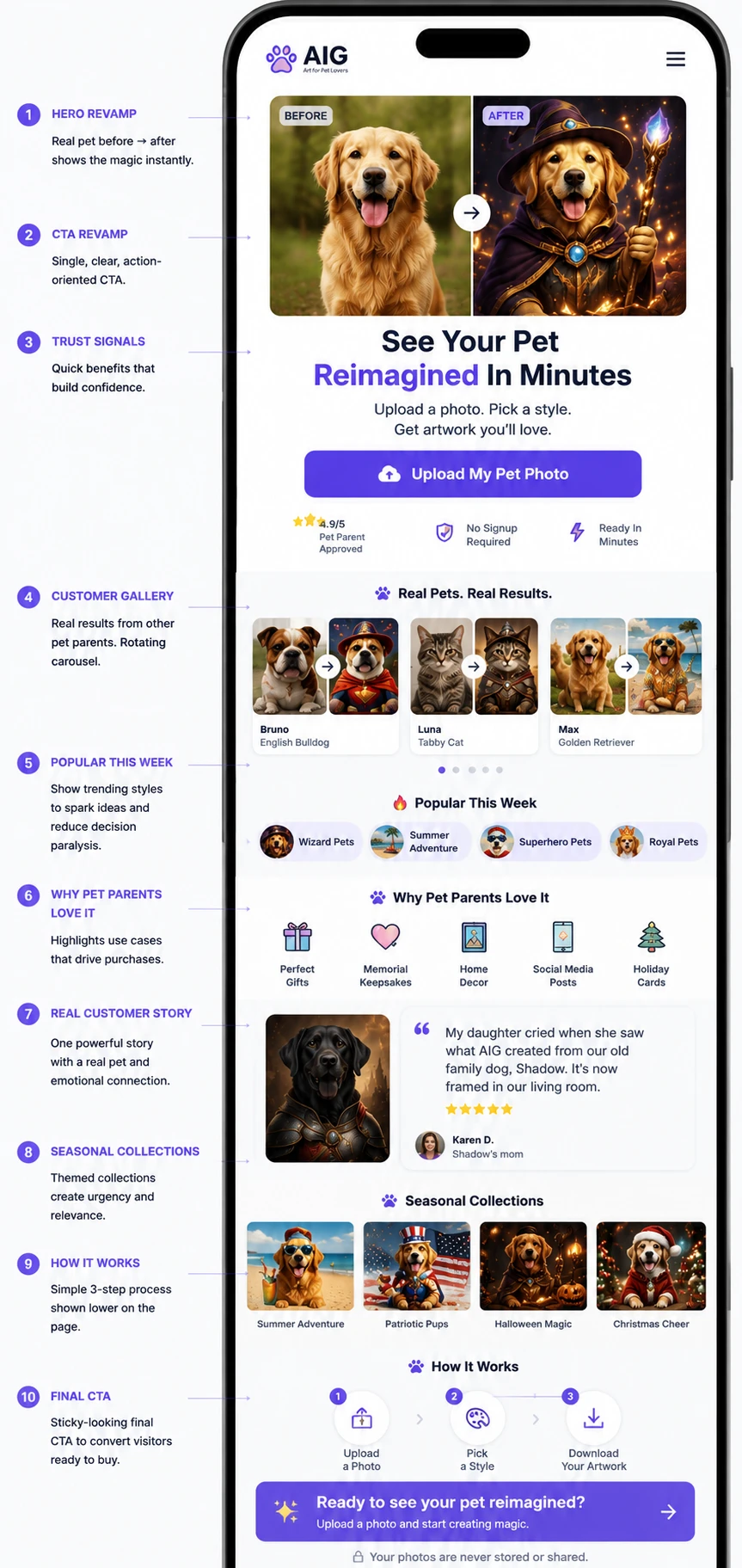
A live, self-funded AI product at animalpics.us. Upload a photo of a pet, pick a theme, get a styled portrait back in under a couple of minutes. I own the entire stack — product, design, engineering, payments, analytics and operations.
The interesting engineering problem
Charging money for a probabilistic operation. An image generation can fail at a dozen points — a bad upload, a moderation rejection, a provider timeout, a model that returns the photo it was given. Each failure mode has a different correct answer to one question: has the customer been charged, and should they have been?
That shaped most of the architecture. Credits are held in Redis and deducted atomically via a Lua script, so a race cannot double-spend one credit. Every failure path after a deduction triggers a refund. The failure taxonomy distinguishes failed before the credit was taken from failed after, and has an explicit category for the ambiguous middle — because “we think it worked” is not something to guess at when someone has paid.
Stack
- Next.js 16 (App Router), React 19, TypeScript, Tailwind v4, Redux Toolkit, deployed on Vercel
- OpenAI
gpt-image-1for generation, with an automatic fallback when the model returns the input unchanged - TensorFlow.js and MobileNet v2 running in the browser to reject non-animal photos before they ever reach the server
- Server-side moderation on both the image and the caption before any generation is attempted
- Stripe Checkout and webhooks, credit packs rather than subscriptions, Redis-backed ledger
- Layered abuse controls: per-IP rate limiting, guest limits, per-session caps, upload size caps with client-side resizing
Running it, not just building it
The part I did not expect to spend the most time on. Eighteen tracked events cover the funnel from first page view through upload, validation, generation, rating and checkout — so a drop-off can be located rather than guessed at. Behind that sits an admin area with dashboards for the ledger, per-device behaviour, failure breakdowns, guest timelines, ratings and month-over-month trends.
Alongside the engineering: pricing and packaging, the landing page and its conversion structure, seasonal themed collections, and the privacy, terms, refund and disclaimer pages that a product taking real payments needs.
What I took from it
Building the generator was the quick part. Everything that turns it into a product people will pay for — deciding what happens when it fails, proving you did not charge someone for nothing, and making a stranger trust an upload form — was the actual work.
Ameriprise
Directory Explorer

Designed and built an internal Active Directory troubleshooting utility that lets engineers inspect a user’s group memberships and directly compare two identities. Instead of manually scanning long membership lists side by side, the tool separates results into shared groups and groups unique to either user, making the access difference immediately visible.
The challenge
Application-access incidents rarely arrive labelled as access incidents. They arrive as “the app is broken for me” — a page that errors, a section that is missing, a control that does nothing — and the engineer who picks up the ticket often finds the application behaving perfectly against their own account. The real difference sits in directory group membership, where it is entirely discoverable and genuinely tedious to find.
The established workflow was to retrieve memberships for a working user and a non-working user and determine, by eye, what differed. That approach does not scale with list length, and it fails in a specific way: two similarly named groups read as a match during a visual scan, so an engineer concludes the memberships are identical when they are not — and the investigation moves on to the wrong hypothesis under time pressure.
The solution
An SSO-protected Node.js and TypeScript application that retrieves and normalises Active Directory membership information, then performs the comparison automatically and presents the differences rather than the raw data.
The design decision that mattered was treating comparison, not lookup, as the primitive worth building. A known-good user is a baseline; everything useful falls out of diffing against it. Two engineers on the same team might share a hundred groups and differ by three, so the tool leads with the three and keeps the hundred available but deliberately de-emphasised. A diagnostic tool should present the conclusion and keep the evidence one click away.
- Single-user role and group lookup
- Two-user comparison
- Shared membership identification
- Groups exclusive to either user, surfaced separately
- Structured results shaped around troubleshooting rather than raw directory output
- SSO-protected access, read-oriented by design
Technical approach
- Identity — SSO-authenticated internal access
- Directory — Active Directory membership lookup
- Backend — Node.js and TypeScript
- Processing — normalisation, then set-based membership comparison
- Output — shared, User A only, User B only
My contribution
- Identified the repetitive troubleshooting workflow worth automating
- Solution architecture and comparison design
- Node.js and TypeScript implementation
- Directory integration and membership normalisation
- SSO integration
- Developer-focused output design
Outcome
- Replaced manual side-by-side group comparison with an automated one
- Reduced the troubleshooting surface by leading with differences instead of full membership lists
- Established a reusable internal workflow for diagnosing user-access discrepancies
- Kept directory information behind SSO rather than exposing it through an unrestricted utility
Scope discipline
The tool reports what the difference is; it does not change permissions. The obvious feature request for something like this is a button that fixes the problem, and declining that is a deliberate security decision rather than an omission — turning a read-only diagnostic utility into a permission-management surface changes its risk profile entirely and would need an authorisation design of its own.
Engineering takeaway
The highest-value internal tools are rarely large platforms. They find a repetitive decision an engineer is making by hand — here, “what is different between these two users?” — and encode that decision into a small, focused workflow. Automating the data retrieval would have solved the part that was already easy; automating the investigation is what saved anyone time.
Read the full technical write-up — the engineering decisions behind the comparison model, and why the tool stays read-only.
DELP Onboarding
Led the design and delivery of an internal developer onboarding and learning portal built on Next.js, Node.js, TypeScript, and PostgreSQL, reducing time-to-first-contribution from four weeks to one week. Achieved a 75% reduction in onboarding time while standardizing developer enablement across teams and lowering senior engineer dependency.
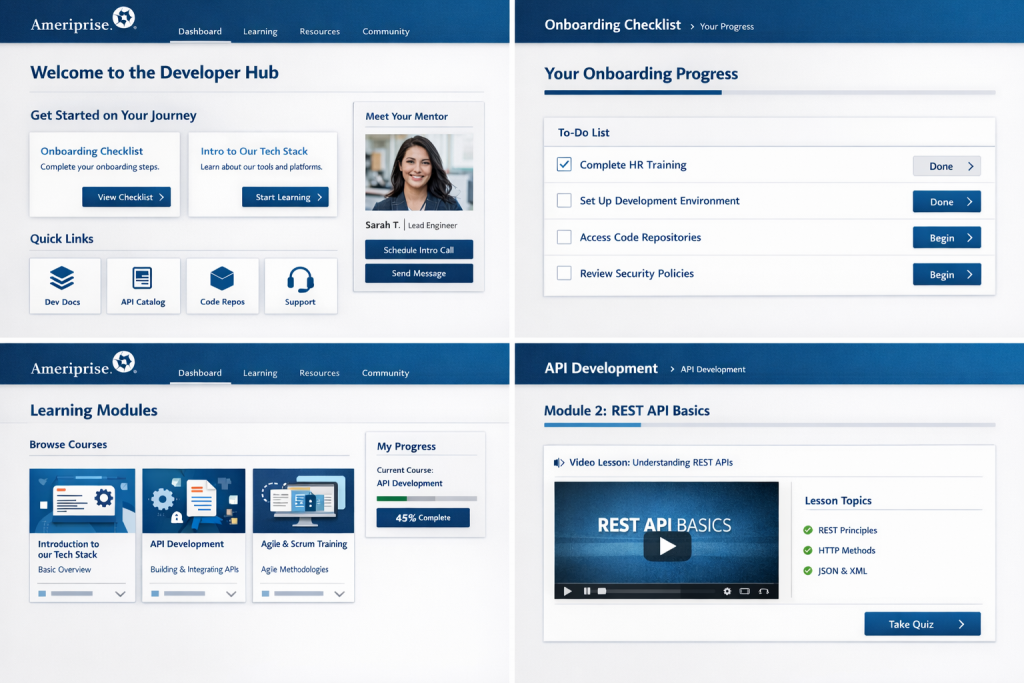
Designed and launched a centralized video learning portal using React and TypeScript, integrated with external content REST APIs, to host onboarding, KT, and vendor technical sessions. Enabled asynchronous, on-demand learning across departments and significantly reduced developer-led knowledge transfer sessions and ad-hoc documentation.
Directed the consolidation of 20+ standalone Git repositories into a monorepo architecture, modernizing CI/CD pipelines to align with Jenkins Shared Library best practices and enterprise standards including JPM, Hamcrest, and Git. Introduced automated email notifications with direct Jenkins console links, enabling developer self-service troubleshooting and reducing DevOps involvement by 30%.
CIA Content Inventory Audit
Led the development of a Content Inventory Audit capability for Bloomreach CMS using Java, React, and TypeScript to enforce FINRA compliance across all product teams. Integrated external AdTrax REST APIs to ensure all content was uniquely identifiable and traceable, preventing non-compliant content from being published, reducing regulatory risk, and saving product teams approximately 30% in manual content tracking effort.
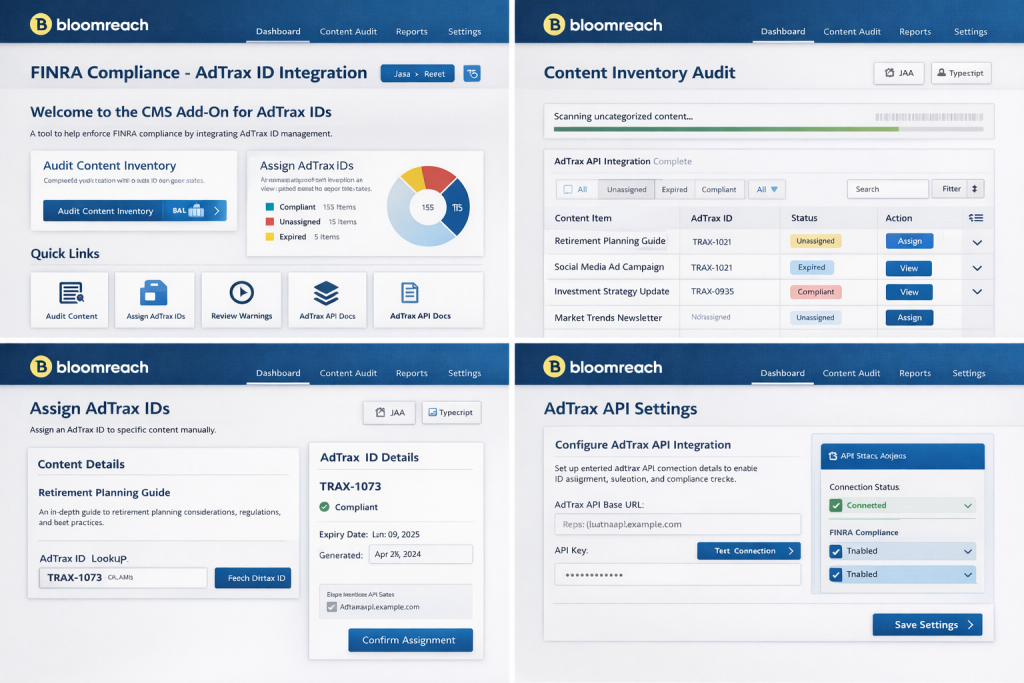
Defined and rolled out a standardized SPA architecture package for frontend teams, enabling rapid conversion of static pages into CMS-driven React SPAs. Reduced page modernization and conversion timelines by 40% while improving consistency, maintainability, and long-term scalability.
SPA Adoption
Led the migration of the company’s Newsroom pages from an external vendor to an internally owned React and TypeScript SPA backed by REST APIs. Eliminated vendor dependency and delivered six-figure annual cost savings. Developed and delivered a CMS training curriculum enabling teams to self-manage content updates.
Delivered a self-service HTML email editor in React and TypeScript that enabled business units to generate standards-compliant HTML email outputs without engineering involvement, reducing delivery bottlenecks and accelerating campaign execution.
Led the migration of 20+ locally hosted applications to AWS EKS, establishing containerization and deployment standards using Bitbucket, Jenkins, Docker, Kubernetes, and Podman. Authored architectural specifications, capacity and traffic forecasts, migration timelines, and risk plans; provided executive-level project tracking and reporting through completion. Improved system reliability to 99% uptime while reducing infrastructure costs.
College of the Holy Cross
Full Redesign, mobile port and Subsidiary websites
The goal
The primary goal was a Drupal version step with a redesign of the main web vehicle. Secondarily we wanted to move the website into a current version CMS environment that would allow more flexible content display and also reduce the amount of content authors with access to the website to limit accessibility exposure.


The design phase
Creating information architecture mapping and a set of responsive annotated wireframes and a proposed site map, validated by mapped student experience journeys. We partnered with an agency to develop new templates under our guidance and quality control.


The design intention
We wanted to create consistency and alignment between different parts of the digital experience. In redesigning our content components, we solved the issue of finding the right balance between providing enough flexibility to the content authors but also limiting some of the core functionality for editors – this provides a consistent user experience and limits accessibility problem exposure.

The result
The redesigned responsive site launched in 2021 and provided a new platform for further consolidation of dispersed digital experiences.
Metrics showed a continued increase among mobile users, a trend that started with the last redesign 2015. With the new set of assets, I updated the remaining web vehicles to follow the refreshed look and feel.
Challenges
- Updating the CMS two version steps, this included a new Database design structure in a very content heavy website.
- Creating information architecture that spans across multiple online vehicles.
My contribution
Deliver Main level navigation from wireframes, user stories, user flow studies.
Data import via Api from other College web vehicles like Newsroom.
Information architecture mapping to exchange information across ecosystems.
Template and functionality creation from Design/Wireframes/Component UI.
Performance testing/accessibility/usability testing.
Product Ownership Technical Coordination with Agency and Network OPs.
My tools
Adobe CC
Axure RP
InVision
WAVE
Slack
Mobile porting
The goal
Create a unified UX across multiple web vehicles on mobile. User numbers continued a trend towards using mobile instead of desktop screen sizes.
The result
We achieved a unified look and feel for all supported web vehicles on mobile screen sizes and started to distribute content based on the user’s screen size.


My contribution
- Main level navigation wireframes, user stories, user flow studies.
- Student personas and journey mapping.
- Information architecture mapping to exchange information across systems.
- Design/Wireframes/Component UI.
- Performance testing/accessibility/usability testing.
- Product Ownership Technical.
My tools
- PHP
- HTML/CSS
- Adobe CC
- Axure RP
- InVision
- Slack
John Hancock
Marketing Websites & Interactive Applications
Served as the product owner for the technical development of over 20 websites and 13 standalone apps in HTML and JavaScript/XML/PHP for the U.S. marketing department.
Executed the development of applications for B2B and B2C client use such as Calculators and Video players with extended interactive user logic.
Led the development of machine-readable search tools in connection with XML and MySQL.
Responsible for the User Interface Design and Tracking Analytics of such apps.
Collaborated with the design department, video vendors and product stakeholders to deliver marketing and training materials or documentation.


My contribution
- Design, Development/Component Ux.
- Performance Testing/Accessibility/Usability testing.
- Product Ownership Technical.
My tools
- Visual Basic
- Flash IDE
- HTML
- PHP
TechTarget
B2B Marketing Templates & Campaign Pages
Spearheaded the development of HTML pages and templates for the company’s B2B marketing team. Directed the department in the development of custom Flash apps and animated digital assets.
Created wireframes and graphic design work for web vehicles and collaborated with stakeholders to deliver marketing materials for the international market and professionals in the U.S.


My contribution
- Design/Wireframes/Component UI.
- Performance Testing/Accessibility/Usability testing.
- Product Ownership Technical.
British Telecom
Flash E-Learning Applications
Took project comps from the product owner and realized them from start to finish with minimal supervision within a predetermined time and budget frame. Part of a 35-person marketing team within the companies headquarter.
Responsible for the development of Flash E-Learning Apps to support the international marketing team. Created web vehicles wireframes for the U.S. marketing department.
Partnered with project managers, coaching professionals, voice actors, and digital music professionals. Collaborated with the design department and product stakeholders to deliver marketing and training materials or documentation.


My contribution
- Design/Wireframes/Component UI.
- Performance Testing/Accessibility/Usability testing.
- Product Ownership Technical.
Puma North America
Campaign Microsites & Flash Applications
Developed Flash apps and HTML pages to support the international marketing team for various online campaigns for the company website and multiple microsites.
Facilitated with the international marketing team in the development of web assets for PUMA’s popular „I’m Going“ series, conceived by Tank in 2006.
Supported the international stakeholders and their partners in Germany and Austria.